
Download SEOGPT – AI‑Powered On‑Page SEO Optimization Tool
Overview
SEOGPT is a cutting‑edge, AI‑driven web application designed to simplify on‑page SEO tasks for digital marketers, content creators, and website owners. Leveraging the power of GPT technology, SEOGPT automatically scans the content of any webpage you visit and instantly generates SEO‑friendly meta titles, descriptions, and keyword suggestions. This eliminates the tedious manual copy‑and‑paste routine that typically consumes hours of a marketer’s time.
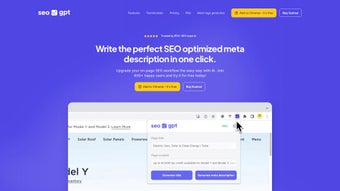
The solution is delivered as a lightweight Chrome extension, meaning you can create optimized SEO snippets directly from the browser without leaving the page you’re working on. Whether you’re optimizing a single blog post or managing a large e‑commerce catalog, SEOGPT offers a seamless workflow that lets you focus on strategic growth while the AI handles the repetitive optimization work. With a flexible pricing model that includes a robust free tier, monthly subscriptions, and a one‑time payment option, SEOGPT caters to both casual users and enterprises that need continuous SEO support.
Key Features That Set SEOGPT Apart
- AI‑Generated Meta Titles & Descriptions: Instantly creates unique, keyword‑rich meta tags based on the page’s content.
- One‑Click Chrome Integration: Works as a browser extension, allowing you to generate SEO snippets without leaving the page.
- Keyword Suggestion Engine: Analyzes content and recommends primary and secondary keywords to improve relevance.
- Bulk Optimization Mode: Supports batch processing for multiple URLs, perfect for large sites.
- Real‑Time SEO Score: Provides a quick readability and SEO score to help you fine‑tune content on the fly.
- Customizable Templates: Save preferred title and description structures for consistent branding.
- Free Tier & Flexible Plans: Start for free, then upgrade to monthly or lifetime plans as your needs grow.
- Secure Cloud Processing: All AI calculations happen on encrypted servers, ensuring data privacy.
- Regular Updates: Continuous improvements driven by user feedback and the latest SEO best practices.
- Multi‑Language Support: Generates SEO copy in over 20 languages, ideal for global audiences.
Installation, Usage Instructions & Compatibility
Getting started with SEOGPT is intentionally straightforward. Follow these steps to install the extension and begin optimizing your pages in minutes:
Step‑by‑Step Installation
- Visit the Chrome Web Store and search for “SEOGPT – AI SEO Assistant.”
- Click Add to Chrome and confirm the permissions request. The extension icon will appear next to your address bar.
- After installation, click the icon to open the welcome dashboard. You’ll be prompted to create a free account using your email or Google login.
- Choose your preferred plan (Free, Monthly, or One‑Time). The free plan provides up to 50 AI‑generated snippets per month.
- Once logged in, navigate to any webpage you wish to optimize. Click the SEOGPT icon, and the AI will instantly analyze the page content.
How to Use SEOGPT Effectively
After clicking the extension, a side panel slides out showing three primary tabs: Title Generator, Description Builder, and Keyword Suggestions. The AI reads the page’s heading hierarchy, main body text, and existing meta tags (if any) to craft fresh SEO copy. You can edit the suggestions directly in the panel, save them to your clipboard, or export them to a CSV file for bulk uploads. For bulk mode, simply upload a list of URLs in the dashboard, and SEOGPT will process each page sequentially, delivering a downloadable report with all generated meta data.
Compatibility
SEOGPT’s Chrome extension runs on any operating system that supports the Chrome browser, including Windows 10/11, macOS Monterey and later, Linux distributions, as well as Chrome on Android and iOS. Because the AI processing occurs in the cloud, there are no heavy local system requirements, ensuring fast performance even on modest hardware. The web‑based dashboard is also responsive, allowing you to manage your SEO projects from tablets or smartphones when you’re away from your desktop.
Pros and Cons – An Honest Evaluation
Pros
- Rapid generation of SEO‑friendly titles and descriptions saves time.
- Seamless Chrome integration eliminates the need for manual copy‑pasting.
- Free tier is generous enough for freelancers and small blogs.
- Multi‑language support expands usability for international markets.
- Bulk processing feature is ideal for large e‑commerce sites.
- Regular updates keep the tool aligned with Google’s algorithm changes.
Cons
- Advanced features (e.g., bulk export, custom templates) are locked behind paid plans.
- Currently limited to Chrome; no native extensions for Firefox or Edge.
- AI suggestions may occasionally require manual tweaking to match brand voice.
- Free tier caps at 50 generations per month, which may be restrictive for power users.
Overall, SEOGPT delivers a compelling blend of AI convenience and practical SEO functionality. Its real‑time generation and Chrome‑first design make it a standout tool for anyone looking to streamline on‑page optimization without sacrificing quality.
Frequently Asked Questions
Is SEOGPT really free to use?
Yes, SEOGPT offers a free tier that allows up to 50 AI‑generated meta titles and descriptions per month. This is ideal for freelancers, small blogs, or anyone wanting to test the tool before committing to a paid plan.
Can I use SEOGPT on browsers other than Chrome?
At present, SEOGPT is released as a Chrome extension only. However, the web dashboard is fully functional on any modern browser, so you can still generate SEO snippets without the extension.
How does SEOGPT handle data privacy?
All content analysis is performed on encrypted servers, and no personal data is stored beyond what is necessary for account management. SEOGPT complies with GDPR and CCPA standards.
Can I customize the generated meta tags?
Absolutely. After the AI proposes a title or description, you can edit the text directly in the side panel, apply your own brand tone, or select from saved templates for consistent styling.
What payment options are available for premium plans?
SEOGPT accepts credit cards, PayPal, and major digital wallets. You can choose a monthly subscription or a one‑time lifetime license, both of which unlock unlimited generation and advanced bulk tools.
Conclusion – Boost Your Rankings with SEOGPT Today
If you’re looking for a fast, reliable way to generate SEO‑optimized meta data without the usual manual grind, SEOGPT is a tool worth adding to your digital arsenal. Its AI engine, Chrome‑first design, and flexible pricing make it suitable for everyone from solo bloggers to large marketing agencies. Start with the free plan to experience the speed and accuracy of AI‑driven SEO, then upgrade when you need unlimited generations and bulk processing capabilities. Click the download button below, install the extension, and watch your on‑page optimization become a seamless part of your daily workflow.



.png)



